

It’s not always straightforward to handle email data, especially when you have to deal with Lotus Notes NSF files. A lot of businesses and people still have crucial emails, contacts, and calendars saved in NSF format. But these days, most businesses utilize Microsoft Outlook, Office 365, or another email service. This is a significant problem: how do you convert data from NSF to a newer format without losing anything?
This is when a professional converter comes in handy. It gives you a straightforward and safe way to convert mailbox data from NSF files into formats that are easy to use and access to. In this blog, we’ll talk about what an NSF Converter is, why you need one, how it works, and how software can help you do this quickly and easily.
What does NSF mean?
The NSF file format is used by the IBM Lotus Notes and HCL Notes email programs. It keeps all the mailbox data in one file, which includes:
- Emails
- Attachments
- Contacts
- Calendars, tasks, and notes
Lotus Notes is the major email and collaboration tool in many businesses, and NSF files are used there. Many people convert NSF files to more standard formats like PST or Office 365 because they can’t be opened natively in Outlook, Gmail, or other email clients.
What does an NSF Converter do?
The Lotus Notes Converter is a software that can convert Lotus Notes NSF files into other types of files. NSF files keep all the information in your mailbox, like emails, attachments, folders, contacts, calendars, and more. You can only open these files using IBM Lotus Notes or HCL Notes.
But a lot of people prefer to open their mailbox data in Outlook, Gmail, or other email services. You can’t do that directly with NSF files. So, a professional software assists by converting these files into formats like PST, EML, MSG, MBOX, and other platforms.
It makes your old email data useful again in simple terms.
Why an NSF File Conversion Tool Is Important?
People look for an NSF Conversion Tool for a lot of different reasons. Some of the most common examples are:
Going to Outlook or Office 365
- A lot of businesses are converting from Lotus Notes to Microsoft Outlook or Office 365. You can’t access old NSF files on these platforms unless you convert them.
Accessing Old Emails
- Users still need to be able to get to their old emails and attachments that are kept in NSF files, even if Lotus Notes is no longer installed.
Backing up and archiving
- Converting NSF files into other formats makes it easier for people to back up and keep track of their data.
System Changes
- NSF files may not work anymore when businesses upgrade their systems or switch email servers.
Software is the best answer in all of these situations.
Problems with Manual Conversion
Some users try to convert NSF files manually, but this process has a lot of problems:
- It takes a lot of time.
- Needs technological know-how
- Data might be lost or broken.
- Attachments and formatting may not stay the same.
- Not good for big mailboxes
That’s why it’s better and safer to use professional software.
Why Data Conversion Tools Are Important?
WholeClear NSF Converter is made to make converting NSF files easy, quick, and correct. It works for both people and corporations.
Here are several important benefits:
1. Works with several formats
2. Keeps Data Safe
- During conversion, all emails, folders, attachments, and formatting are kept.
Batch Conversion - You can convert more than one NSF file at a time, which saves time and work.
3. Simple to Use
- Anyone can understand the software’s straightforward UI.
4. Quick Performance
- Even big mailboxes can be turned into something else easily.
5. No File Size Limitation
- Users can convert as many files or folders as they want without any restriction.
6. Free Demo
- This software comes with a free demo version to let users check out its features and function before making any purchases.
How to Use the Software?
The software is straightforward to use:
1. Install and open the software.
2. Choose the NSF file or folder you wish to convert.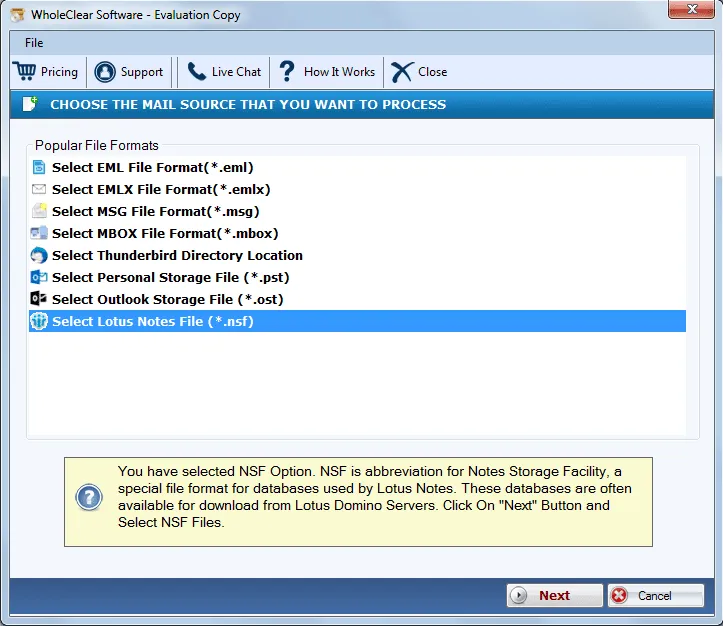
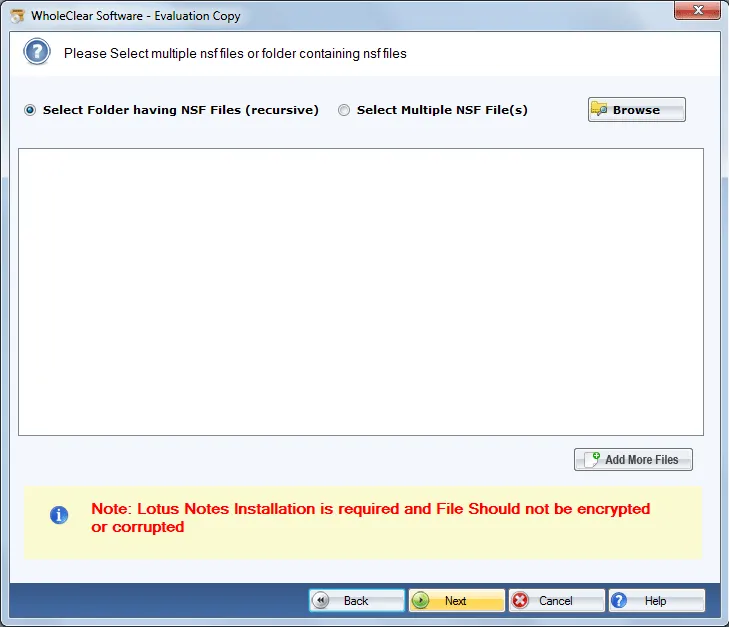
3. Pick either Folder or File mode and then upload Lotus Notes NSF files. Click on Next.
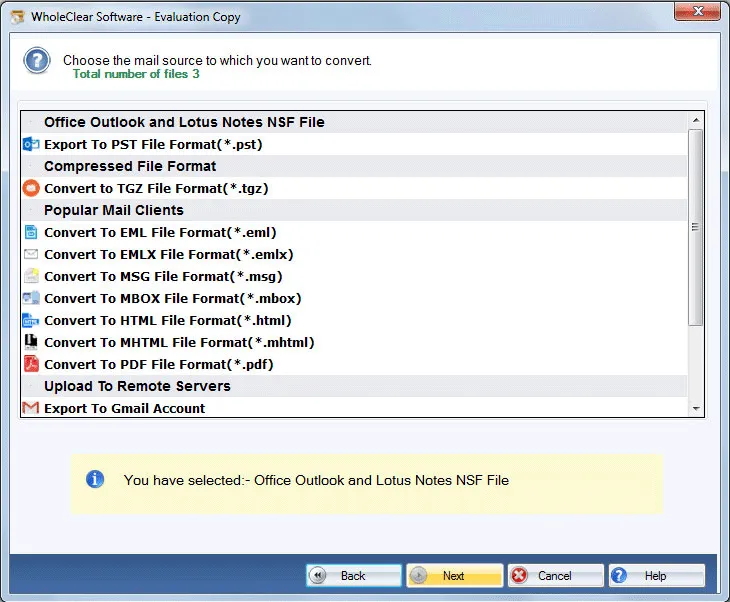
4. Select the export format you want.
5. Choose the location where you want to keep the data.
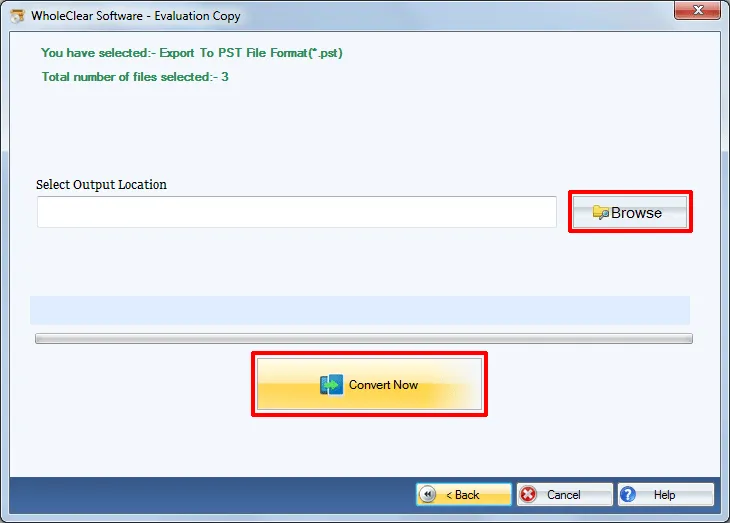
6. Press the “Convert” button and wait for the job to be done.
Your mailbox data will be ready in the new format in just a few minutes.
How does this solution make migration easier?
There are many benefits to using a professional Converter:
- Saves time
- Lessens the chance of losing data
- Can handle big mailbox files
- Compatible with all NSF versions
- Gives results that are correct and complete.
This means that organisations can convert their email with no disruptions.
Who Can Use This Tool?
Anyone can utilise the software:
- IT administrators
- Business users
- Legal and compliance teams
- Home users using older Lotus Notes data
- Anyone migrating to Outlook or Office 365
It works for both big and small amounts of data.
In conclusion
It doesn’t have to be hard or risky to convert NSF files. If you have the correct tool, you can convert your mailbox data swiftly and safely. The software is a safe and easy-to-use tool for converting NSF files into formats that are easy to find and work with.
This software offers a clever and easy way to switch email platforms, get to old data, or make backups. It saves you time, keeps your data safe, and makes moving your email easy and stress-free.


Leave a Reply