

A successful demo does not guarantee that the product is ready for launch, and a failed account test, an incomplete support guide, or an early email can spoil everything if not considered during the final product launch meeting. Technology product launch planning allows one to identify weak spots and decide whether to proceed with the launch, limit the scope of the product, or postpone it.
Start With the Launch Goal and Scope
Start with the customer’s first useful result. In this example, a small business owner needs to sign up, create a monthly report, and share it. A new color scheme for the dashboard might be welcome, but it does not help if a customer cannot create the report.
The first release can be described in three lines:
- Customer: A small business owner who needs to prepare a monthly report.
- Essential task: Create and share the first report without help.
- Early sign of success: New accounts are fully set up and can generate that first report.
This strategy helps the team to understand exactly what they have to do to prepare for the product launch. If the sign-up process freezes on Tuesday, this issue should be resolved at once. In contrast, the changes to the optional chart can be postponed to another day when the team will have enough time.
Map Tasks, Owners, and Dependencies
A product launch timeline is more than a date on a calendar. Testing, the help guide, the sales demo, the website update, and support training all take time.
- Sales cannot rehearse the final demo until it is stable.
- Support cannot finalize its guide until known problems are acknowledged.
- Marketing cannot extend invitations until sign-ups are functional.
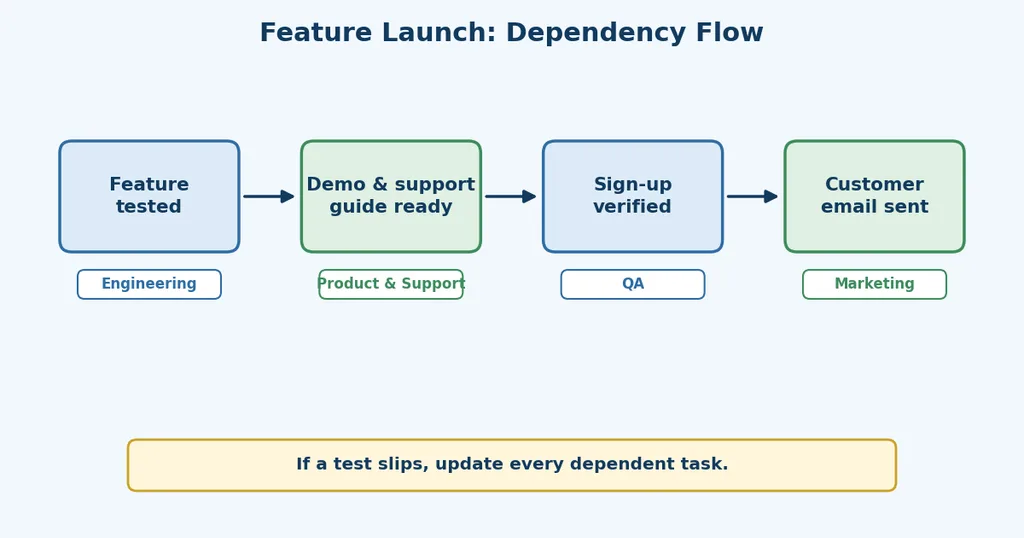
Product launch milestones, such as the beta feedback reviewed and the customer materials approved, keep everyone up-to-date with the progress without getting too bogged down in the daily details.
What Should a Product Launch Plan Include?
Keep a source of truth regarding the goal, the scope of the release, owners, deadlines, dependencies, and tests that should pass. It is necessary to highlight who can approve or block the launch, when the launch should be announced, and what steps the team should take after the launch.
Make Each Handoff Visible
Project planning is more effective if specific action is defined for each handover. For example, ‘product sends the tested sign-up steps to support by Wednesday’ defines what both teams should do: ‘prepare support’ is too generic.
Decide What Ready to Launch Means
At the final review, the team checks the customer task, support readiness, and its ability to respond to errors.
- Customer task: A new account signs up and creates a report
- Support: Staff have the current guide and a contact for urgent issues.
- Recovery: The team can spot errors and stop or recover from a bad release.
Agree on a limit before the last test. For example, the team might decide that sign-up failures above its agreed level will hold the public email. Product launch risk management becomes useful when a concern has an owner, a measure, and an action attached to it. These decisions depend on clear project management and review practices throughout the launch.
| Evidence at the final review | Release decision | Next action |
| A required customer task still fails | Delay | Fix the issue and repeat the test |
| Core tasks pass, but a limited issue needs monitoring | Release to a small test group, if it can be supported | Name the group, owner, and next review time |
| Core tasks pass, support is ready, and monitoring works | Full release | Follow the launch-day schedule |
Put One Person in Charge of the Release Call
Before launch week, name the person who has final authority. That person reviews the test results with engineering, product, marketing, and support. The go/no-go launch decision may be a full release, a limited release, or a delay. The technology product launch plan records the reason, the next action, and the time of the next review so nobody has to reconstruct the decision from chat messages.
If the Launch Is Delayed
Designate someone to take ownership of the unresolved issue and set a date for another round of testing. The website schedule will also need to be updated, the email paused, and the internal teams and customers who were promised access notified. All of that should be done in addition to actually getting the work done by the new deadline.
What the Plan Looks Like in Practice
Consider a hypothetical Friday launch for a new reporting feature. On Tuesday, beta testers report that certain new accounts can’t produce a report.
The reaction is swift:
- The product team records the issue and marks the first-report test as failed.
- Engineering investigates the cause of the impacted accounts.
- The Friday email is postponed by marketing.
- Support obtains the information required to assist beta users.
By Wednesday, engineering finds that the error occurs when an account has no billing address. It prepares a fix. Testers try the full sign-up and reporting process both with and without billing details. They check for new errors as well.
At Thursday’s review, the decision owner will evaluate those results. If the fix passes and support has the updated guide, we’ll consider doing it again on Friday. If those results are mixed, then maybe we could do a smaller release, assuming we can identify those users and get them feedback and help quickly. Otherwise, the date would change.
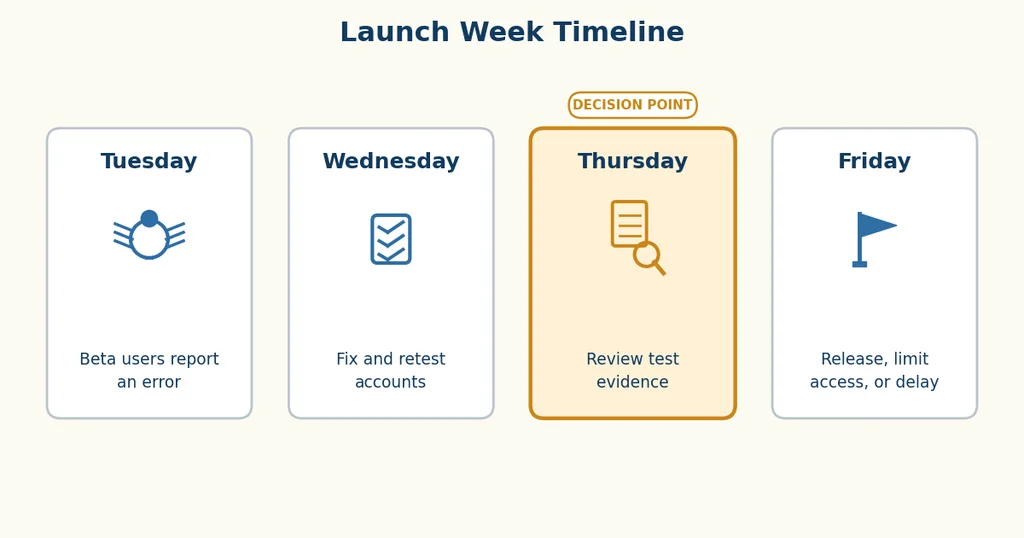
A short recorded decision keeps engineering, support, and marketing from acting on three different versions of the situation.
Coordinate Launch Day
Once the release is approved, sequence the work:
- Release the feature and test sign-up and reporting in the live product.
- Update the website, then send the customer announcement.
- Keep support available while the first customers try it.
Project planning for product launches ensures that every task has an owner and a backup. One person will monitor the registrations and report any errors; another will collect and consolidate customer questions. In addition, if it becomes clear that the limit will be exceeded, the launch team will be prepared to stop the campaign or take other actions.
Measure What Happens After Release
Pick the main things to track after the launch:
- Interest: New sign-ups
- Use: Finished setup and first reports
- Problems: Errors and support questions
Look at these numbers together: if many people sign up but few finish setup, there may be a problem with the sign-up process. More errors or support questions may also show that something needs fixing. Give each problem to someone and set a date to check it.
The failed test from the opening scene never needed to become a public failure. A technology product launch plan made it visible in time for the team to choose its next move. Teams developing these habits can find related learning among SterlingNext’s project management training options.



Leave a Reply