

Email is an important aspect of how businesses communicate to each other every day. People and businesses often have to switch email platforms over time to get improved functionality, security, or compatibility. But moving emails from one platform to another can be hard, especially if the formats are different. Converting from IBM Notes (Lotus Notes) to email applications that can open MBOX files, such as Thunderbird, Apple Mail, or Entourage, is a popular migration situation.
It can be hard to convert NSF files (used by Lotus Notes) into MBOX format. Users commonly have problems like losing data, corrupting it, or not completing the migration. This is where a tool that converts NSF files to MBOX files comes in handy. These kinds of solutions make conversion easier by making sure that the process goes smoothly and that no emails, attachments, or metadata are lost.
This article will talk about what NSF and MBOX files are, the frequent problems that come up when you convert them, and how a good converter like NSF to MBOX Converter can help.
What NSF and MBOX Files?
NSF stands for Notes Storage Facility. It is the format that IBM Lotus Notes uses to keep emails, contacts, calendar entries, tasks, and other information. Each NSF file is like a database that stores all the things in a user’s mailbox in a structured way.
NSF is great for Lotus Notes users, but it doesn’t work with a lot of other email clients. So, when people move to an email client that uses MBOX files, like Thunderbird or Apple Mail, they need to convert their NSF files to MBOX format.
What does MBOX mean?
Many email clients support MBOX, which is a popular format for storing emails. This format saves all emails in one text file, which makes it easy to import them into multiple email programs. Some popular email clients that work with MBOX are:
- Mozilla Thunderbird
- Apple Mail
- Entourage
- Eudora
Converting NSF files to MBOX is a typical task during email migrations because it is simple and works with all email clients.
Common Conversion Issues
It can be hard to convert from NSF to MBOX by manually, and there are often a lot of problems that come up.
- Loss of Data: When you convert files manually, you could lose emails, attachments, or metadata like sender information and timestamps.
- Corruption of Files: If you don’t use the right tools to convert NSF files, they could become corrupted and unusable.
- Time-Consuming Process: Manual conversion takes a long time and requires technical expertise, which can be hard for people who aren’t tech-savvy.
- Problems with compatibility: Not every email client can import NSF files directly. You can’t get to your emails on the new platform unless you convert them.
- Partial Migration: Sometimes, just certain emails are converted over, and others stay inaccessible.
These problems show how important it is to use a dedicated tool to make sure the conversion is safe, complete, and quick.
How The Lotus Notes to MBOX Converter Helps
The WholeClear NSF to MBOX Converter is a trustworthy way to fix these conversion problems. This tool is meant to make the process of converting emails easier and safer. This is how it helps:
- Full Data Migration: It converts all of your emails, attachments, contacts, calendars, and information without losing any of them.
- Works with Big NSF Files: The utility can handle big NSF files without crashing, so even corporate mailboxes won’t have any problems.
- Easy to Use: The software features an interface that is easy to understand, so both technical and non-technical users can use it.
- Batch Conversion: Users can convert more than one NSF file to MBOX at the same time, which saves time and effort.
- Keeps Emails Safe: The program keeps the original structure of emails, including folders, so the converted mailbox looks precisely like the original.
- Works with All MBOX Clients: You can import MBOX files into Thunderbird, Apple Mail, Entourage, and other email programs that work with MBOX after you convert them.
This application helps people and businesses avoid common problems that come up during conversion and make sure that their vital data is safely moved.
A Quick Guide to Using the Software
- Download and install the software, then open it.
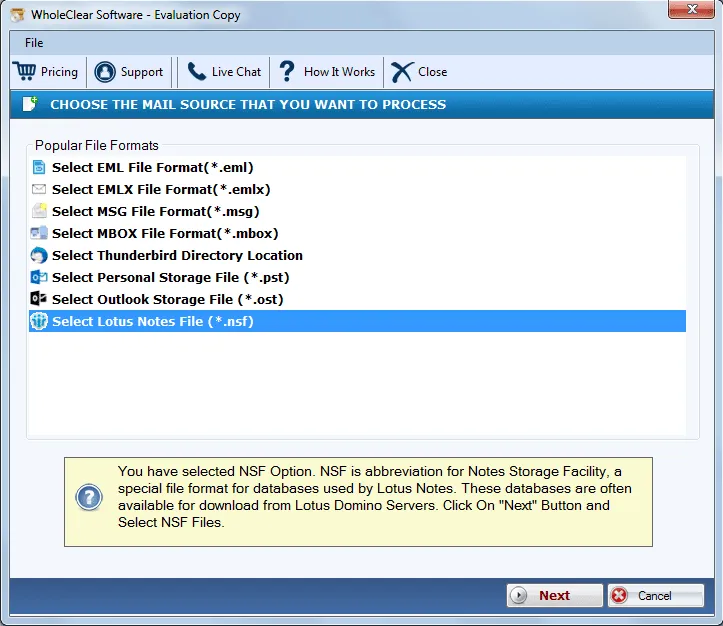
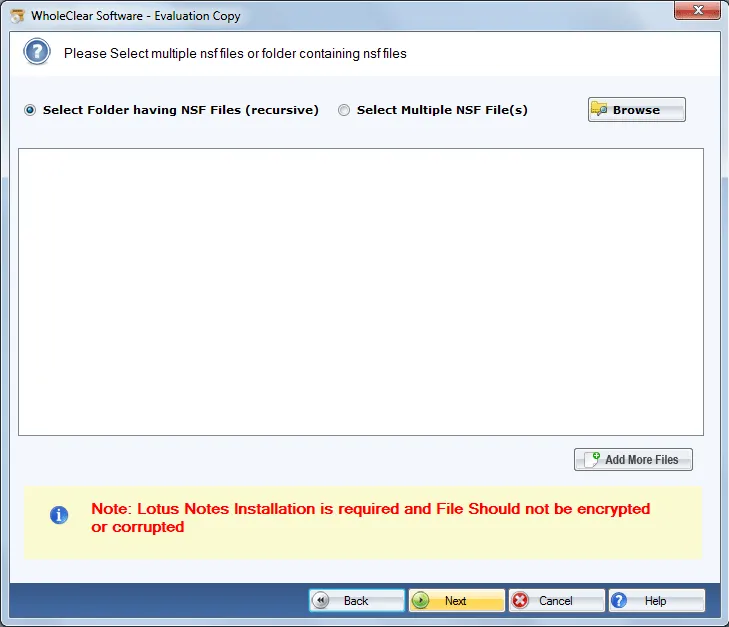
- Add NSF Files: To add your NSF files, click “Add File” or “Add Folder.”
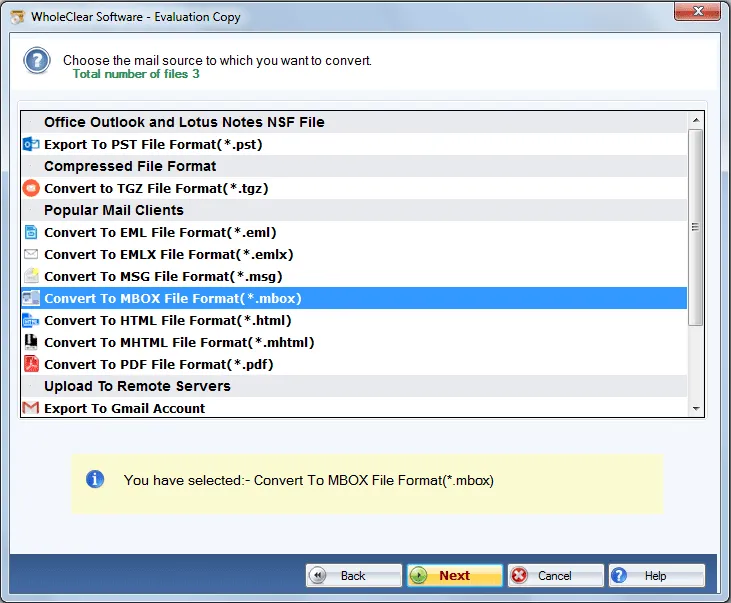
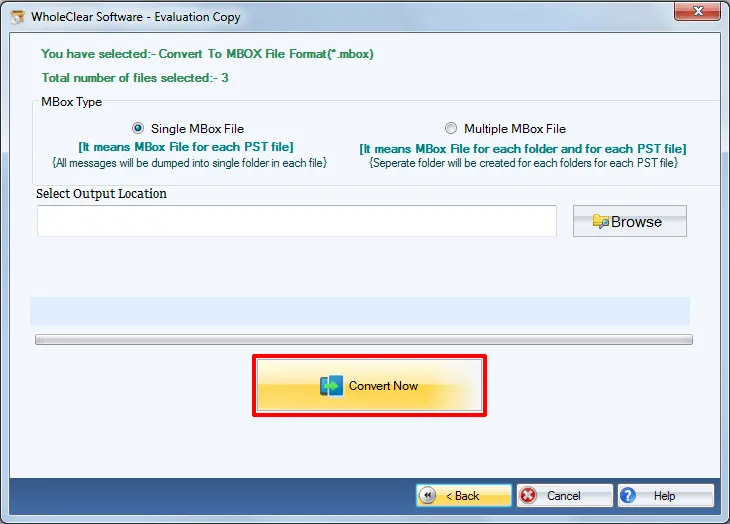
- Choose MBOX as the output format and a folder to save the files to.
- To start the procedure, click “Convert.”
Advantages of the Software
- Quick and easy: You can migrate everything without having to wait hours.
- No Risk of Losing Data: All emails and attachments are migrated safely.
- Time-Saving: The easy-to-use UI and batch conversion make things easier.
- Businesses can count on it: it’s good for both individuals and groups.
- Cross-Platform Flexibility: You can easily switch from Lotus Notes to any email client that supports MBOX.
Conclusion
Migrate IBM to MBOX can be hard because the file formats don’t work with each other. Most email programs can’t open NSF files directly, so you need to convert them to MBOX first. It’s risky, slow, and likely to lose data when you do things manually.
The software is a safe, quick, and dependable way to do things. It makes sure that the migration is complete and that no emails or attachments are lost. It also works with large files and keeps the structure of your mailbox the same. This application makes the conversion process easier and gets rid of frequent problems that come up while converting email, whether you are a single user or a business.
FAQs
Q1. Is it possible to use this utility to convert big NSF files?
Yes, the software can handle big NSF files and do batch conversions quickly.
Q2: Will my attachments be safe while they are being converted?
Of course. The software makes sure that all email attachments are saved with the emails.
Q3. Do I need to know how to utilize this tool?
No. The tool is easy to use and doesn’t require any technical skills.
Q4. What email programs can open MBOX files?
You can import MBOX files into Thunderbird, Apple Mail, Entourage, Eudora, and other email clients that support MBOX.
Q5. Is there a chance that data will be lost?
No. The software is made to keep all emails, folders, and metadata safe during migration.

Leave a Reply